Informative callouts
Show info, warning, or danger banners above the tab field body, inside the shared form shell (submit + active-tab field unchanged).
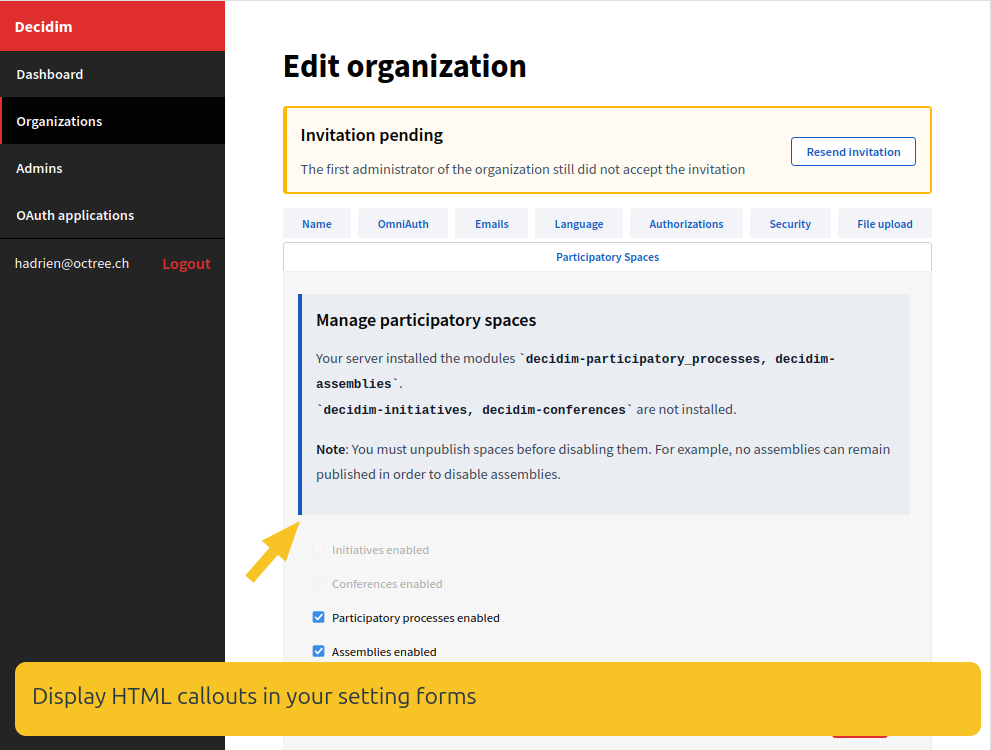
Setup
Include Decidim::Toggle::TabForm (recommended) or Decidim::Toggle::InformativeCallouts on the form class:
module MyModule
  class AdminConfigForm < Decidim::Form
    include Decidim::Toggle::TabForm
    include Decidim::Toggle::ModuleConfigForm

    self.module_config_name = "my_module"
    mimic :organization

    attribute :enabled, :boolean

    info :defaults_callout

    info :installed_modules_callout,
         if_predicate: ->(form) { form.missing_modules.any? }

    warning :disable_warning_callout,
            if_predicate: ->(form) { form.enabled == false }

    danger :other_gem_required_callout,
           if_predicate: ->(*) { Decidim::Toggle.gem_present?("decidim-other") }

    def defaults_callout
      "Defaults apply to new organizations only."
    end

    def installed_modules_callout
      I18n.t("my_module.admin.missing_modules", missing: missing_modules.join(", "))
    end

    def disable_warning_callout
      "Disabling removes public access to #{module_label}."
    end

    def other_gem_required_callout
      "Requires decidim-other in the Gemfile."
    end
  end
end
Macros
| Macro | Style | When to use |
|---|---|---|
info :method_name | Info (blue) | Context from a form instance method (HTML allowed) |
warning :method_name, if_predicate: | Warning (yellow) | Reversible caution before save |
danger :method_name, if_predicate: | Alert (red) | Strong caution, destructive or risky change |
The first argument is a Symbol naming a method on the form (form.public_send(symbol)).
if_predicate receives the form instance; omit it to always show the callout.
Rendering
Callouts render via SettingsFormBuilder#informative_callouts inside decidim_toggle_settings_tab_form — above the field body.
They appear in form_layout_partial: tabs when you wrap fields with decidim_toggle_settings_tab_form.