Good job integration
Good job is an active_job adatper that have several advantages over sidekiq:
- It use postgres, no need to have a dedicated Redis database in append-only-mode
- It does not loose job by default, no need for sidekick-plus
decidim-voca prepares the good-job adapter with decidim-friendly values. It will:
- Reproduce sidekiq default behaviour (restart failing jobs)
- Mount a system-protected dashboard on
/system/active_jobs - Add environment variable configuration for 12factors config
Installation
If you installed decidim-voca previously, the migrations for good jobs are already installed.
To enable the good_job use, you need to define the active_job adapter to good_job in your config/environments/production.rb:
# config/environments/production.rb
Rails.application.configure do
  config.active_job.queue_adapter = :good_job
end
This will enable the use of good_job, and mount the dashboard. To run good_job in an external process, you will need the binstub:
bundle binstubs good_job
# bin/good_job gets created
Pool connection
On async server mode, good_job is configured with 5 additional threads. This means it will uses
more db connection (1 per threads). As the default for most configurations are to set the pool size
to the value RAILS_MAX_THREADS, your application will broke if you do not setup pool to rails max threads + good job max threads = pool size. See Configuring a database guide
Async Server or External
Good Job offers differents mode, for simplicity purpose, decidim-voca supports two mode:
async_server: Good job will run within your rails server, and execute tasks when it can. Great for small instances.external: Good job will run separatly.
The main change is on the infrastructure side:
async_server: use threads inside the puma server processexternal: use thebin/good_jobprocess to manage its threads
| Async mode | External mode |
|---|---|
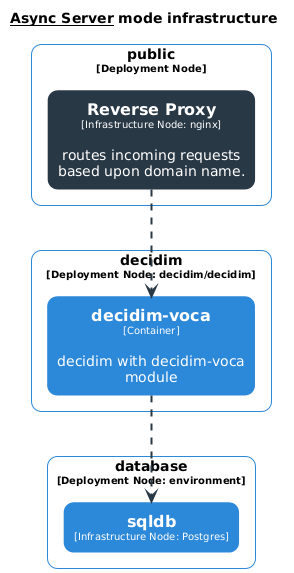 | 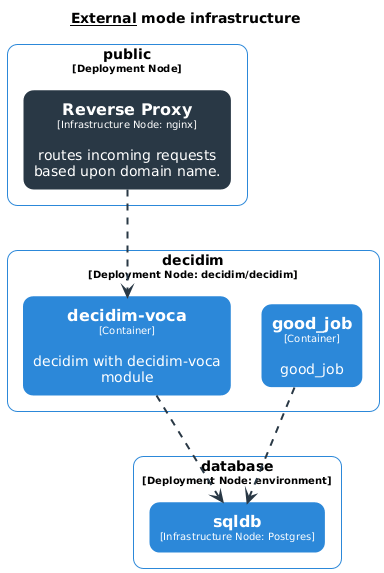 |
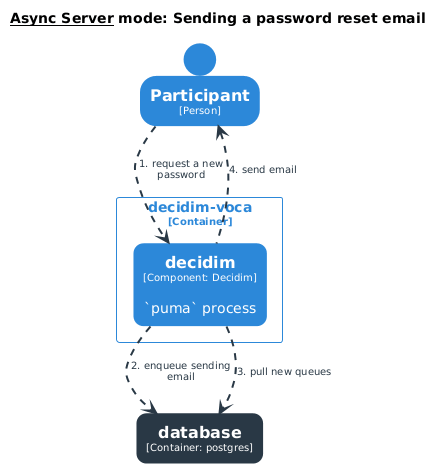 | 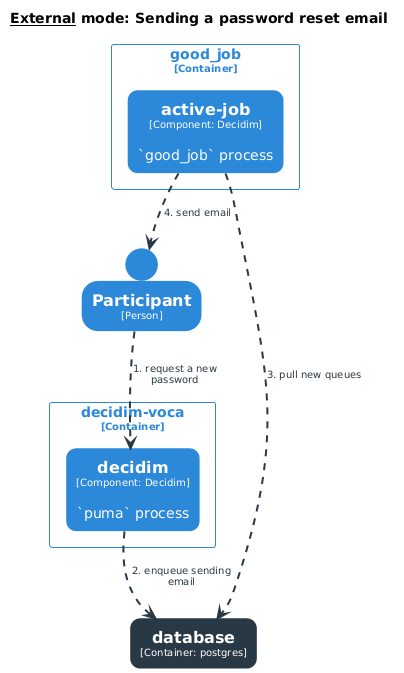 |
Environment Variables
We use environment variables to configure the module:
| Variable | Description | Default | Options |
|---|---|---|---|
VOCA_ACTIVE_JOB_EXECUTION_MODE | Mode for good_job execution | async_server | async_server, external |
VOCA_GOOD_JOB_RETRY | Number of retries before discarding a job | 5 | Integer |
VOCA_GOOD_JOB_MAX_THREADS | Maximum number of threads for job processing | 5 | Integer |
VOCA_GOOD_JOB_POLL_INTERVAL | Polling interval in seconds | 30 | Integer |
VOCA_GOOD_JOB_SHUTDOWN_TIMEOUT | Shutdown timeout in seconds | 120 | Integer |
VOCA_GOOD_JOB_QUEUES | Queue names to process | * | String (see documentation) |